A Real UI for the Wordle Solver
Last year I wrote a simple web service
to generate a list of possible
Wordle words, based to the current state of a Wordle. The API was
rudimentary -- a string containing the words and a string containing the
colors for each letter (B, Y, or G):
API
GET /wordle/?letters=<letters>&colors=<colors>Responses
`200` : `{ "results" : [ "<word>", "<word>" ...]
`400` : `{"code":400,"message":"<error>"}`
`404` : `{"code":404,"message":"More than <max> results found."}`
Example
GET /wordle/?letters=arisetrack&colors=ygbbbbggyg

{
  "results": [
    "CRANK"
  ]
}
I wanted to spend as little time as possible creating a UI for this service, and I particularly didn't want to spend time relearning a framework like Angular. So I wrote a very simple page with about a dozen lines of HTML, some CSS cribbed from the internet, and a little bit of Javascript: Enter the letters and colors and click the (unlabeled) button.
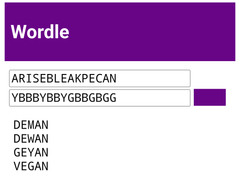
I had been meaning to create something better. When I started to think semi-seriously about it, my first question was how to accept user input. The requirements were:
- Allow direct (keyboard) entry of the words guessed so far.
- Allow the user to specify the color for each entered letter.
- Allow the user to invoke the service and display the result.
I am not much of a programmer, so I thought I was going to wind up with multiple text entry elements (one per word) along with 25 tri-state selectors to select the color for each entered letter.
At some point it dawned on me that in addition to allowing the entry of the colors, the UI also need to display the entered colors and that the most obvious way to do this was with a background color.
Since each letter needed to have its own color, that meant a seperate input element for each letter, which meant that I could use a simple click on the field to cycle through the three possible colors.
By arranging the letters in a 5x5 grid, I would be reproducing the familiar Wordle layout, making it easy to verify that the entries are transcribed correctly.
The last steps were to figure out how to capture keyboard input (so that typing words would enter the values cell-by-cell), mouse clicks, and the Enter key (to obtain a result).
Because the service is very fast, I elected to automatically get results whenever the user changed a color on any cell, and whenever the user completed a word (or completed the deletion of a word).
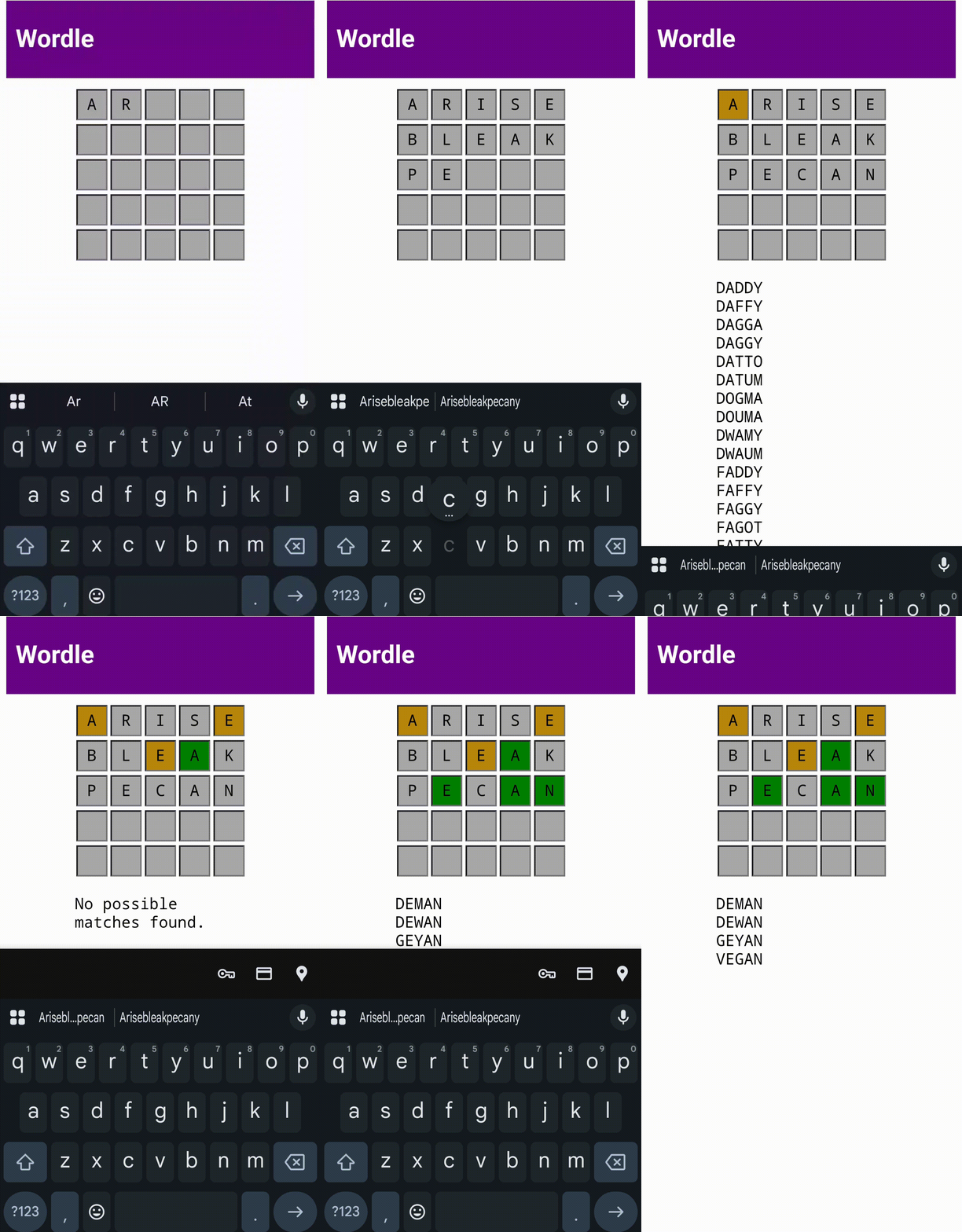
The resulting UI works surprisingly well, both in desktop browser and on my Android device. There were some challenges related to displaying the Android keyboard automatically (I ultimately created an 'invisible' entry element with text and background matching its containing div and then set focus to this field on any click on the page).
The implementation required about 150 lines of JavaScript and 15 lines of HTML.
Older Posts
AMZN
Reasons that I'm happy to own Amazon stock.
Cryptic Build Chain
Infrastructure that lets me write and publish a series of cryptic puzzles.
Touristfahren
From the archive: A lap around the Nürburgring in 2015.
Two for One
Cryptic crossword of the day.
Edge Case
A programming fail.
Cryptic Crossword 'Solving Aid'
Cryptic crossword of the day.
Targetrage
Market arbitrage for bakers yeast.
Chuck and Michael
Koching out.
Bagelnomics
Making bagels to save money.
Google Domains, We Hardly Knew Ya
Burned by a Google beta, again.
Magic
Optimizing the cell service.
Stolperstein
Historic echoes in a European city.
Saturday
Competitive crosswording.
Illustration
Fooling around with illustrations for a shop project.
User Error
Tracking down a network outage.
Quality of Life
Optimizing VS Code on a Chromebook.
Free hosting (multiple domains, SSL, subdomains)
Taking care of domains
vi
Editing the old-fashioned way
Icy Morning
Nürburgring Nordschleife
Going fast in Deutschland
Top of the World, New England Edition
Hiking Mt. Washington